
Reserve Study Software
Unlimited reserve studies. No per-report fees.
50-state compliance, live forecast vs. actuals, and premium PDFs — built for reserve specialists, and the self-managed boards who'd rather run their own study.
Try Apex risk-free for 7 days — full refund if it's not for you.
For reserve specialists & self-managed boards · Compliant in all 50 states · Math validated to the dollar
One flat price. However many reports you run.
Most reserve study software charges a monthly subscription plus a fee for every report you produce — commonly $50 to $100 per report. For 15 reports a year, that pattern typically totals $2,000 to $3,000 before any other costs. Apex Solo is $1,490/yr flat with unlimited reports.
- ✓ Unlimited reserve studies + PDFs
- ✓ No per-report fees, ever
- ✓ Davis-Stirling §5570 + FL SIRS built in
- ✓ Cancel anytime via Customer Portal
- ✓ 7-day refund window
- • $50–$100 per report fee on top of subscription
- • Monthly or annual base subscription
- • Cost scales directly with report volume
- • Compliance coverage typically included
- • Year-round portfolio tooling typically included
Pay once. Run unlimited studies. No per-report math, no surprise bills.
Pricing built for reserve specialists. Unlimited reports on every tier.
One subscription, no per-report fees. Starter fits a single self-managed association; Solo and up scale with a specialist's book of business. Overage $10/property/month ($15 on Starter).
- 1 admin seat
- Up to 5 active properties
- Unlimited reserve studies + PDFs
- Full engine + 50-state compliance
- Sandbox + Solvency Matrix
- Brand customization (logo + color)
- Email support
- 1 admin seat (just you)
- Up to 15 active properties
- Everything in Starter
- Component library — build your own catalog
- Maintenance + Projects tracking
- Live Reconciliations (general-ledger import)
- 5 admin seats — share with your team
- Up to 40 active properties
- Everything in Solo
- Member + Viewer roles for staff and clients
- Shared firm workspace with role permissions
- Portfolio Analytics (multi-property rollup)
- Bid comparison + Contractor directory
- Priority email support
- 15 admin seats
- Up to 120 active properties
- Everything in Studio
- Unlimited Member + Viewer invites
- Phone + email support
Try Apex risk-free for 7 days — full refund if it's not for you.
Need 16+ seats, custom compliance, or an SLA? Custom contracts, dedicated success manager, invoice billing (no Stripe).
All 50 states. One compliance engine.
Studies built to the National Reserve Study Standards (NRSS) in all 50 states — plus statute-specific modules for the 15 states where reserve law has real teeth. Every citation below, no hovering required — or see reserve-study requirements by state.
- California · Davis-Stirling §5570
- Florida · SIRS §718.112(2)(g)
- Nevada · NRS 116
- Hawaii · HRS §514B-148
- Massachusetts · M.G.L. 183A
- Colorado · CCIOA §38-33.3
- Oregon · ORS 100.175
- Washington · RCW 64.34 / 64.38 → WUCIOA (2028)
- Virginia · POAA / Condo Act
- Illinois · 765 ILCS 605
- Connecticut · CIOA Ch. 828
- Delaware · DUCIOA 25 Del. C.
- Utah · Code §57-8a-211
- Minnesota · MCIOA 515B
- Maryland · RP §11
- Any other state · NRSS fallback
Davis-Stirling Act — Civil Code §5570
Apex produces the Assessment and Reserve Funding Disclosure
Summary required by §5570 to accompany every annual
budget report, with citations for §5550,
§5300, and SB 326. Structural-Integrity flag per
component, SI roster, default 3-year reserve-study cycle.
SIRS — F.S. § 718.112(2)(g)
Full SIRS module classifies all 8 mandated
structural components and produces the SIRS disclosures Florida
law requires — the non-waivable structural funding requirement,
10-year cycle, milestone-inspection notes, and the narrower
structural-integrity definition for condos 3+ habitable stories.
Every component, pinned to the actual property.
Drop a pin on the satellite view for each reserve component — buildings, paving, irrigation, pool, hardscape, utilities. Click any pin to drill into the component detail. No more guessing which roof the bid covers.
- High-resolution satellite imagery — recent flyover
- Category-colored pins matching the dashboard donut
- Two modes: view-only for the board, edit mode for the manager

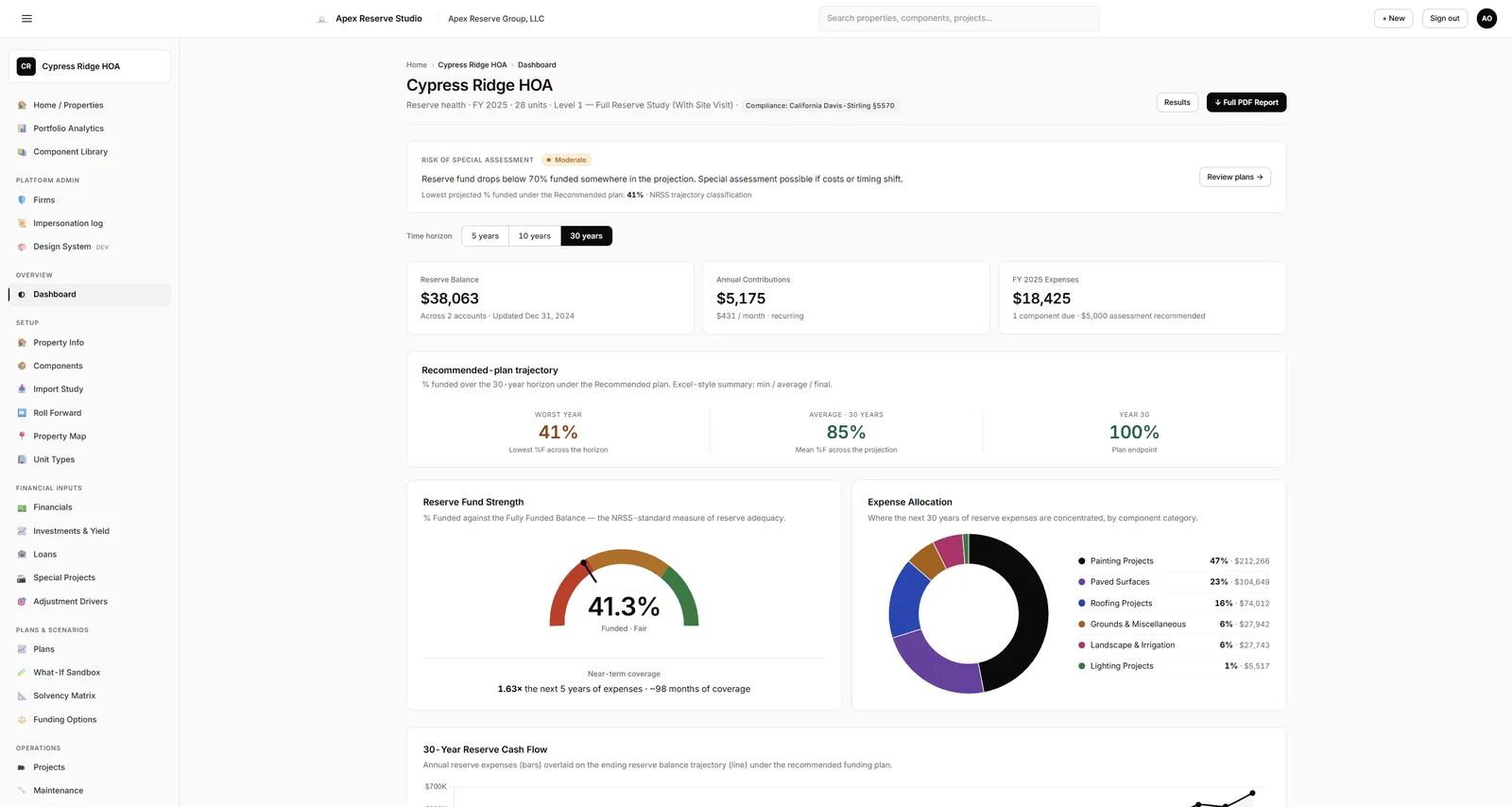
See the whole study at a glance.
Every property opens to a single screen that tells you exactly where it stands — percent funded, fund-strength gauge, projected cash flow over thirty years, and the next reserve event on the calendar.
- Risk gauge calibrated to NRSS thresholds, not vibes
- Live cash-flow chart with overlay of projected vs. actual
- One-click drill down to any component or upcoming project

Run any scenario in seconds, not days.
Compare up to five funding strategies side-by-side. Toggle inflation, interest assumptions, component cost shocks, Remaining Useful Life (RUL) offsets, and special assessments — the engine recomputes the full thirty-year horizon as you type.
- Recommended, threshold, baseline, custom — plus your own stress tests
- Per-column adjustments for inflation, cost multipliers, RUL offsets
- Same engine that drives the official PDF reserve study

Funding adequacy at every dues level — instantly.
A color-coded grid maps reserve-fund strength across every plausible dues-per-unit and time horizon. Strong / Fair / Weak shading tells you where the edge is, so the board can vote with confidence.
- Color-coded NRSS bands: green strong, amber fair, red weak
- Adjustable dues range + step + inspection horizons
- Hover any cell for the full % funded and ending balance

Plan vs. reality, month by month.
Import general-ledger (GL) data directly from AppFolio, Vantaca, or any generic CSV. The reconciliations engine flags variance the moment it exceeds your thresholds, so surprises don't compound into year-end emergencies.
- One-click GL import — AppFolio, Vantaca, or any standard GL export (Buildium, Yardi, and more)
- Color-coded variance flags: ok / watch / alert
- Push real expenses back into the projection automatically

Preventative maintenance — already on the calendar.
Define recurring schedules (quarterly irrigation, semi-annual roof inspections, annual backflow certifications) and the system generates the tasks. Past-due alerts surface immediately on the dashboard so nothing slips.
- Per-component schedules with automatic task generation
- Assign vendors, due dates, hours — track completion
- Past-due banner on the dashboard for the board's attention

Compose the report — section by section.
Build each reserve study the way the client needs it: drag sections into any order, toggle optional blocks on or off, and watch the exact PDF update live on the right as you go. Your layout is saved per property and reused every time you regenerate the report.
- Toggle optional sections — Solvency Matrix, Loan Schedule, Investments, Maintenance, Site Map, Photos, Roll-forward
- Drag to reorder; live PDF preview shows the exact deliverable as you compose it
- Section title pages auto-hide when empty so nothing dangles
- Layout persists per property — same client, same report every time

The page the board reads first.
Every report opens with the one-page executive summary the board absorbs in 30 seconds — percent funded, deficit per unit, recommended monthly allocation, and any special assessment the math calls for. Findings written from the numbers, not opinion. One click downloads the branded PDF, ready to hand to the board or the auditor.
- 4 KPI tiles + 5 allocation tiles tell the whole story above the fold
- Findings narrative generated from the engine — defensible, not vibes
- Branded PDF: your firm name, your logo, your contact info

Reserve studies, done right.
Engine validated to the dollar against an industry benchmark study, live in all 50 states, NRSS-compliant Level I, II, and III output.
Built by reserve specialists — for specialists and the self-managed boards who run their own.
Common questions, answered.
Don't see your question? Email sales@apexreservestudio.com.
What is a reserve study and who needs one?
A reserve study is a long-term financial planning document that inventories an HOA or community association's major reserve components (roofs, paving, mechanical systems, etc.), projects useful life and replacement cost, and calculates the contribution rate needed to fund replacements without surprise special assessments.
California requires one every three years under Civil Code
§5550. Florida condos three or more habitable
stories must complete a Structural Integrity Reserve Study
(SIRS) under F.S. §718.112(2)(g).
Can I import data from other reserve study software?
Yes. Apex imports general-ledger data from AppFolio, Vantaca, or any standard CSV export — so systems like Buildium and Yardi work too — and component lists migrate via CSV import. We don't yet have direct API integrations with the proprietary formats some reserve study platforms use, but the data is portable.
Most consultants migrate one property to Apex as a test, validate the engine math against their existing reserve study, then move the rest of their portfolio.
Does Apex support Florida SIRS (F.S. § 718.112(2)(g)) compliance?
Yes. The Florida SIRS module classifies all eight mandated structural components (roof, load-bearing structure, fire protection, plumbing, electrical, waterproofing, windows and doors, and any other qualifying item affecting those systems) and produces the SIRS disclosures Florida law requires — including the narrower structural-integrity definition, the non-waivable structural funding requirement, the 10-year cycle, and milestone-inspection notes.
The PDF reserve study includes the disclosures Florida law requires.
Does Apex support California Davis-Stirling §5570 disclosures?
Yes. The California module includes a Structural-Integrity
flag per component, SI roster, and citations for Civil Code
§5550, §5570, §5300,
and SB 326.
Apex produces the Assessment and Reserve Funding Disclosure
Summary required by §5570 to accompany every
annual budget report. The default reserve-study cycle is
three years per Civil Code §5550.
Which states does Apex Reserve Studio support?
All 50 states. Every study follows the National Reserve Study Standards (NRSS) — the professional standard nationwide. Fifteen states also get statute-specific modules: California, Florida, Nevada, Hawaii, Massachusetts, Colorado, Oregon, Washington, Virginia, Illinois, Connecticut, Delaware, Utah, Minnesota, and Maryland — plus a GENERIC NRSS fallback that covers every other state.
If your state doesn't have a dedicated module, the NRSS fallback still produces a valid reserve study — and we add new state-specific modules on request. Email sales@apexreservestudio.com to discuss.
Is Apex built for CAI Reserve Specialists (RS) and APRA PRAs?
Yes. Apex is built by and for credentialed reserve professionals. The engine adheres to the Community Associations Institute's National Reserve Study Standards (NRSS), produces NRSS-compliant Level I, II, and III study output, and the PDF templates are designed to meet the reporting standards expected of CAI Reserve Specialist (RS) and APRA Professional Reserve Analyst (PRA) credentialed work product.
Is my firm's data isolated from other firms on Apex?
Yes. Every property, component, financial value, and reserve study you create is scoped to your firm at the database level. Other firms on the platform cannot read, write, or even discover your data.
The Apex support team can opt in to view your firm via a time-limited support-access toggle you control from Settings. It is off by default and auto-expires after 24 hours.
How does Apex compare to per-report pricing models?
Most reserve study software charges a base subscription plus a per-report fee — commonly in the $50 to $100 per report range. For a consultant producing fifteen reports per year, that pattern typically totals $2,000 to $3,000 annually before any other costs.
Apex Solo is $1,490/year flat with unlimited reports. The savings grow with volume: a 40-report firm on Apex Studio at $3,490/year typically saves over $1,000 per year versus per-report pricing.
What's included in the 7-day refund window?
Full refund if you cancel within seven calendar days of your initial Checkout. No questions, no exit interview — email sales@apexreservestudio.com and we issue the refund through Stripe.
After seven days you can still cancel anytime to stop future renewals via the Stripe Customer Portal, but the charge for the period you've already paid — the current month on monthly plans, or the prepaid year on annual plans — isn't refunded.
Will a board, auditor, or lender accept a study I produce in Apex?
A reserve study's credibility rests on two things: that it follows the National Reserve Study Standards (NRSS), and that a qualified preparer stands behind it. Apex produces NRSS-compliant Level I, II, and III output with the state-specific disclosures boards and auditors look for — California Davis-Stirling, Florida SIRS, and the rest — formatted as professional work product under your firm's name and credential.
Apex is the engine and the document; you are the preparer of record. The study carries your firm's branding, never ours.
How fast can I produce my first reserve study?
There's no onboarding queue and no setup call. Your account — and a fully worked demo property you can explore immediately — are ready the moment you sign up.
How fast you produce your first real study depends on how quickly you enter or import the property's components and financials. The built-in component library, CSV component import, and GL import from AppFolio or Vantaca are built to make that a same-day task, not a multi-week setup.
What happens if I go over my plan's property limit?
Reserve studies and PDFs are always unlimited — the only thing a plan meters is the number of active properties (5 on Starter, 15 on Solo, 40 on Studio, 120 on Firm).
If you add more active properties than your plan includes, you're never blocked: each extra active property is billed automatically at a small monthly rate (for example, $10 per property on Solo). Archive a property you've finished and that drops back down on the next cycle.
If I cancel, can I get my data and studies out?
Your work is yours. While your account is active you can download every reserve study as a branded PDF and export your component, plan, project, and analytics data as Excel from each workspace. Anything you've already downloaded is yours to keep.
Closing your account and want a complete export first? Email sales@apexreservestudio.com and we'll make sure you leave with everything.
Give your associations the clarity they deserve.
One subscription. Unlimited reports. No per-report fees. Try Apex risk-free for 7 days.